
Transparent Automation
How the workflow works.
Odour assessment is split into two stages: AERMOD calculates the hourly concentration field, then AERMOD One applies the selected odour assessment method to those hourly results.
- Set up the project. Define the model domain, sources, receptors, meteorology and any required terrain or building downwash inputs.
- Enable Odour Mode. Select the odour assessment settings before entering emission rates.
- Run AERMOD. Check the model messages and review the error file.
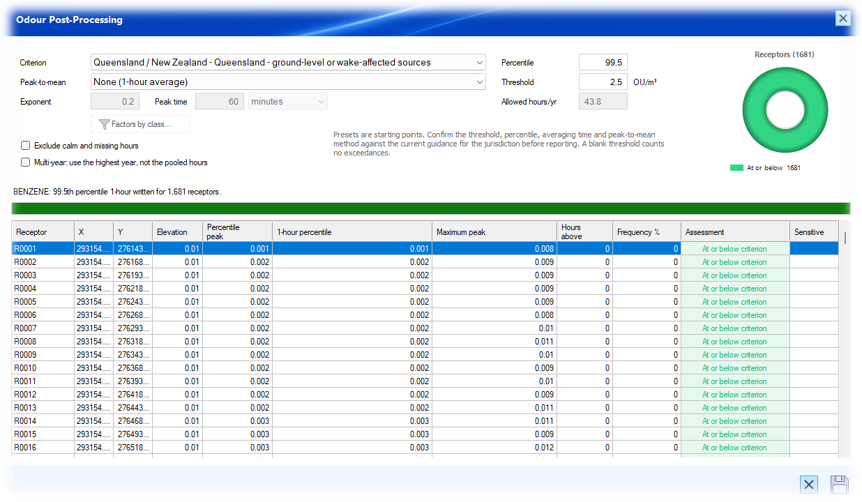
- Post-process the results. Select the applicable criterion and review the assessment grid.
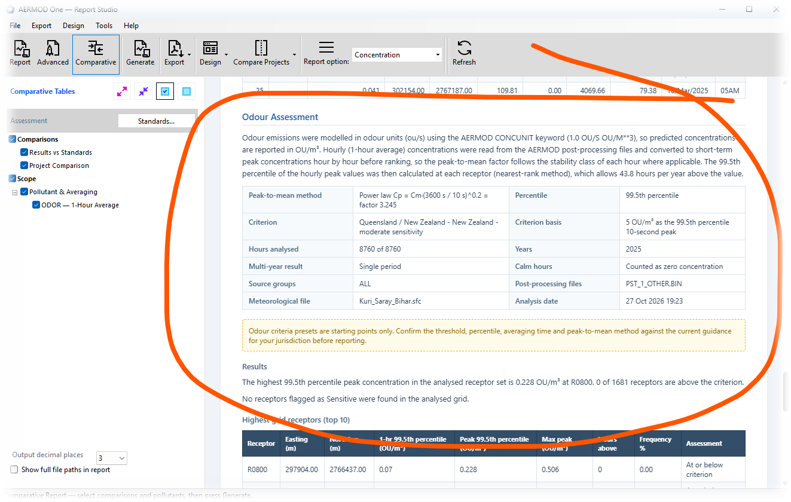
- Visualise and report. Create the odour contour and include Odour Assessment in the report.
Odour modelling and assessment in one workflow.
Configure an odour assessment, run AERMOD, and evaluate the results using odour criteria and peak-to-mean methods in AERMOD One. Odour Mode prepares the dispersion run for odour assessment. Odour Post-Processing then applies the selected assessment settings to the hourly results already produced. Change the criterion or peak method without rerunning AERMOD, provided the underlying model inputs have not changed.
One dispersion run
Build the model and generate the required hourly files once. Reassess different criteria from those stored results when the model inputs stay the same.
Guided configuration
Odour Mode sets the key model controls for the odour workflow, including one-hour averaging, concentration output and hourly post-processing files.
Assessment-ready outputs
Review receptor results, hours and frequency above the criterion, contours and a report section for the odour assessment.
Odour assessment capabilities
Criterion presets and custom settings
Start with available presets for UK and Ireland, New South Wales, Queensland and New Zealand, Germany, or Ontario, or use Custom. Confirm the current applicable guidance before reporting.
Peak-to-mean methods
Choose the method required by the assessment, including no factor, power law, flat factor 4, stability-class exponents, or a source-type-by-stability table.
Source classification and groups
Classify relevant sources by source type and, for the supported table method, wake-affected or wake-free category. The modeller is responsible for the classification.
Receptor assessment
Review the assessment at each receptor, including the criterion outcome, hours above and frequency. Sensitive discrete receptors can be flagged where appropriate.
Calm-hour and multi-year options
Where appropriate, exclude calm or missing hours using the surface file, or assess the highest calendar year instead of a pooled multi-year distribution.
Contours and reporting
Generate an odour plot, an odour contour image and structured assessment output, then include the Odour Assessment section in Report when available.
Important modelling considerations
- Odour Mode does not convert mass emission rates into odour emission rates. Enter rates in the units shown by the source grid after enabling the mode.
- Criterion presets are starting points, not a substitute for checking the current jurisdictional guidance.
- Odour-unit results do not include receptor background concentration in this workflow.
- The Germany preset identifies AUSTAL as the reference model. Any use of AERMOD should be stated transparently in the report.
- The optional low-wind sensitivity case uses a US EPA ALPHA option and should be reported separately from the regulatory default run.
The difference
Designed to reduce repeat work.
When only the criterion, percentile or peak-to-mean method changes, run Odour Post-Processing again against the existing hourly files. Rerun AERMOD if emissions, source groups, receptors, meteorology, terrain or buildings change.